I had 445 business license records sitting in a CRM. Company name, address, and a license type. That’s it.
I needed to call these people. And you can’t open a cold call with an address.
The obvious move is to pay someone. Apollo, Clay, ZoomInfo, any of a dozen others will take a list like that and hand you back enriched records. It works. People build entire sales organizations on it.
But I sell on-premises automation. My whole pitch to a therapy practice or a law firm is that I’ll build you a system where your client data stays on hardware you own. Then I’d turn around and upload 445 local businesses to a vendor in exchange for a monthly subscription? That’s a contradiction I’d have to explain on every sales call, and I wouldn’t have a good answer.
So I built it myself. Six components on a used workstation in my basement, running on a GPU somebody gave me. It works, mostly. This article covers how it’s put together, every bug that cost me a full day, and the part I didn’t expect: I ran a formal accuracy check on it, and the results told me my core design assumption had been wrong for about a week.
What the alternatives actually cost
Worth being specific about what I decided against, because the comparison isn’t as one-sided as self-hosting advocates usually make it sound.
Apollo runs $49 to $119 per user per month on annual billing, with the Organization tier requiring a three-seat minimum. Everything runs on credits, and a full enrichment with phone data can burn nine or more credits per contact. Clay overhauled its pricing in March 2026 and now sells Launch at $185 a month and Growth at $495, both running on two separate meters, one for marketplace data and one for platform actions. A representative five-step workflow on 500 contacts lands somewhere around $0.65 to $1.20 per contact. ZoomInfo doesn’t publish prices at all. Third-party data puts entry at roughly $14,995 a year with a three-seat minimum, and the median signed contract at $31,875 across more than 1,300 verified purchases.
For 445 leads that I’d enrich once, Clay’s Launch plan is the sane commercial answer. Call it $185 for a month, do the work, cancel. That’s cheap. I’m not going to pretend otherwise.
Here’s what that number doesn’t cover.
Every lead I upload becomes a row in someone else’s system. Every observation the enrichment makes about a Salt Lake City therapy practice lives in a database I don’t control, under terms I didn’t negotiate, subject to a retention policy I didn’t read. For my own prospecting that’s a nuisance. If I ever wanted to run the same process for a client, on their customer list, it’s a conversation with their compliance officer that I’d rather not have to start.
And the pricing model tells you what you’re actually buying. Credits get consumed whether or not the lookup succeeds. Clay charges for every enrichment attempt regardless of whether data is found, and teams see failed lookup rates in the twenty to thirty percent range. You’re renting access to a black box that bills you for its own misses. You never find out why a lookup failed, because the mechanism isn’t yours to inspect.
That last part turned out to matter more than the money. About sixty percent of this project was debugging, and every one of those bugs was findable because I could open the box.
The hardware, which cost less than one month of Clay
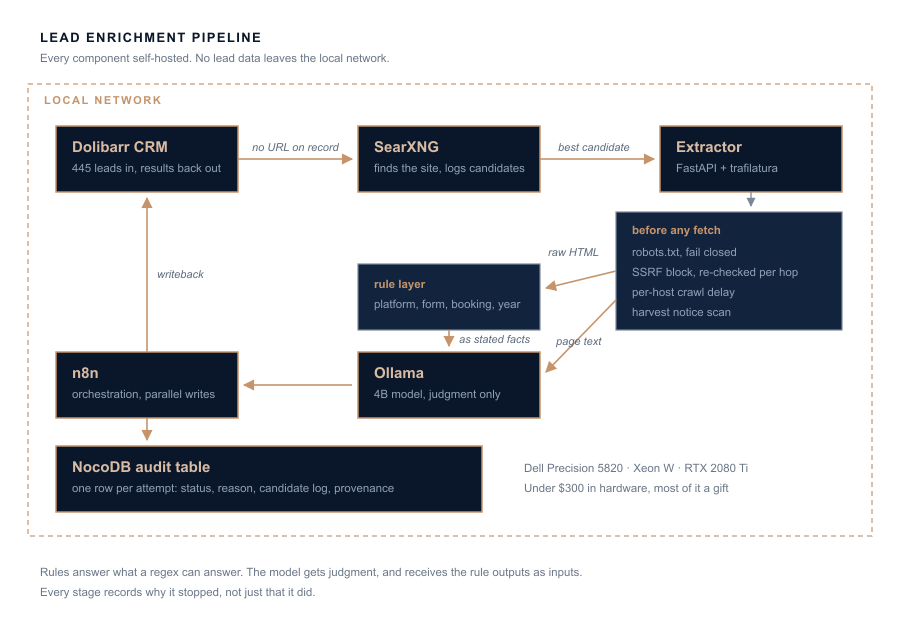
A Dell Precision 5820 with a Xeon W and 16GB of ECC memory. I paid about $200 for the whole machine. The RTX 2080 Ti in it was given to me. I bought a second 2080 Ti for around $80 that’s still sitting unused.
That’s the entire capital cost. Under $300, and most of the value was a gift.
The model is a 4B parameter extraction model, quantized to 8-bit. It’s about 4.2GB on disk and it lives entirely in VRAM, which means the VM around it only needs a few gigabytes of system memory. It’s not a big model and it isn’t trying to be. It has one job, which I’ll get to.
Everything runs under Proxmox. The workstation handles search and extraction, and a second older node runs the orchestrator and the model. Both sit behind a Cloudflare tunnel for the pieces that need to be reachable, and nothing that touches lead data leaves the LAN.
One hard-won note if you’re building something similar: don’t install NVIDIA drivers directly on a Proxmox host. I did that once for an unrelated reason, the DKMS build failed against the Proxmox kernel but still ran update-initramfs, and it embedded broken hooks into every initramfs image on the box. The machine hung on boot at the handoff from initramfs to systemd, on all three installed kernels. I spent an evening chrooting in from a USB stick trying to unwind it and ended up reinstalling from scratch. Use VFIO passthrough to a VM instead. The GPU works exactly as well and the host stays clean.
How the pipeline is put together
Six pieces, chained.
Dolibarr holds the leads and receives the results. It’s the CRM I already run for my own business, and the enrichment fields live in custom extrafields on the third-party record.
SearXNG finds the company’s website when the CRM doesn’t have one. It’s a self-hosted metasearch front end that queries a dozen engines and returns aggregated JSON. Critically, it’s mine, so I can see exactly what came back and why.
A custom extractor written in Python with FastAPI and trafilatura. It fetches the page, checks robots.txt, blocks internal network addresses, applies a crawl delay, extracts readable text, and runs a set of regex detections against the raw HTML.
Ollama runs the 4B model, which reads the extracted text and produces a judgment about what automation opportunity the business might have.
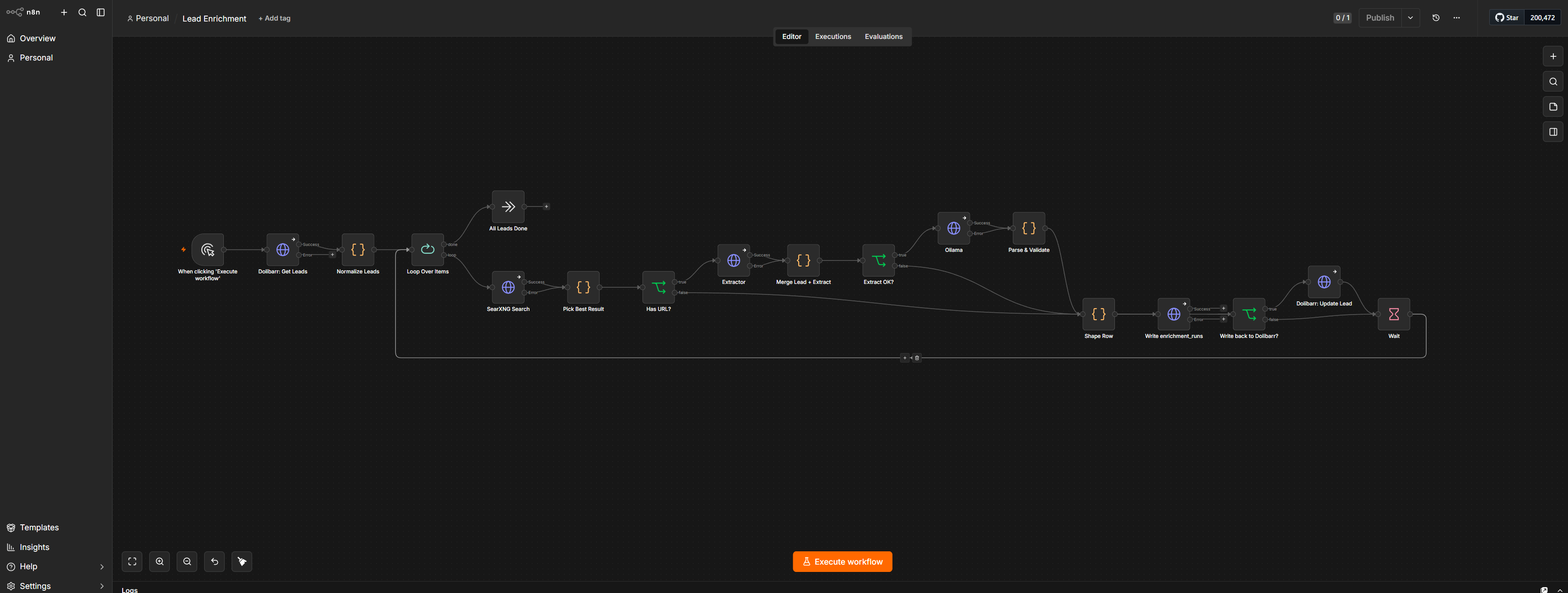
n8n chains all of it together and handles the writebacks.
NocoDB holds an audit table. One row per attempt, with about forty columns recording not just what happened but why.
That last one sounds like overhead. It’s the single most valuable component in the system and I’ll come back to why.
The part most people skip
Before any of the interesting work, the extractor does a set of things that produce no output at all.
It reads robots.txt first, every time, and it fails closed. If robots.txt says no, the fetch doesn’t happen. If robots.txt is unreachable, times out, or returns something unparseable, that also counts as no. During my last validation run one lead resolved to a site whose robots.txt timed out, and the pipeline recorded ROBOTS_DISALLOWED and moved on without fetching a byte.
That turned out to be lucky in a way I’ll get to later, but the behavior is deliberate. A crawler that treats an ambiguous signal as permission isn’t honoring robots.txt, it’s honoring robots.txt when convenient.
It blocks requests to private address ranges, and it re-checks on every redirect hop. A URL that starts on the public internet and redirects to 192.168.1.1 gets dropped at the hop. This matters because the URLs come from search results, which means they come from outside, which means treating them as trusted input would be a server-side request forgery waiting to happen.
It applies a per-host crawl delay, tracked in process. That constraint forces the extractor to run single-worker, which caps throughput. I decided that was fine. Nothing about this workload is urgent.
It sends a real user agent that identifies what it is. It scans for harvest notices, meaning language on the page that objects to automated collection, and records what it found.
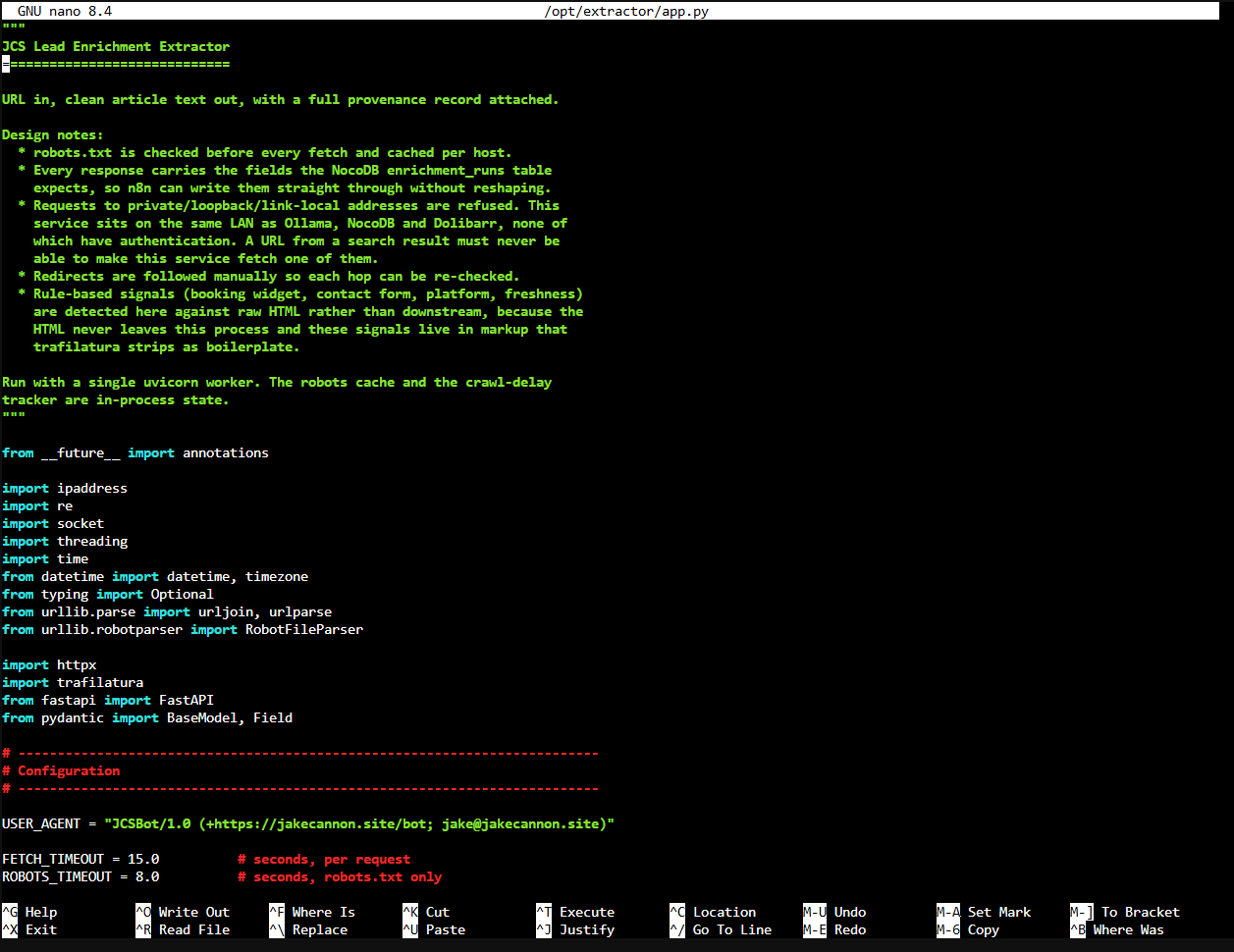
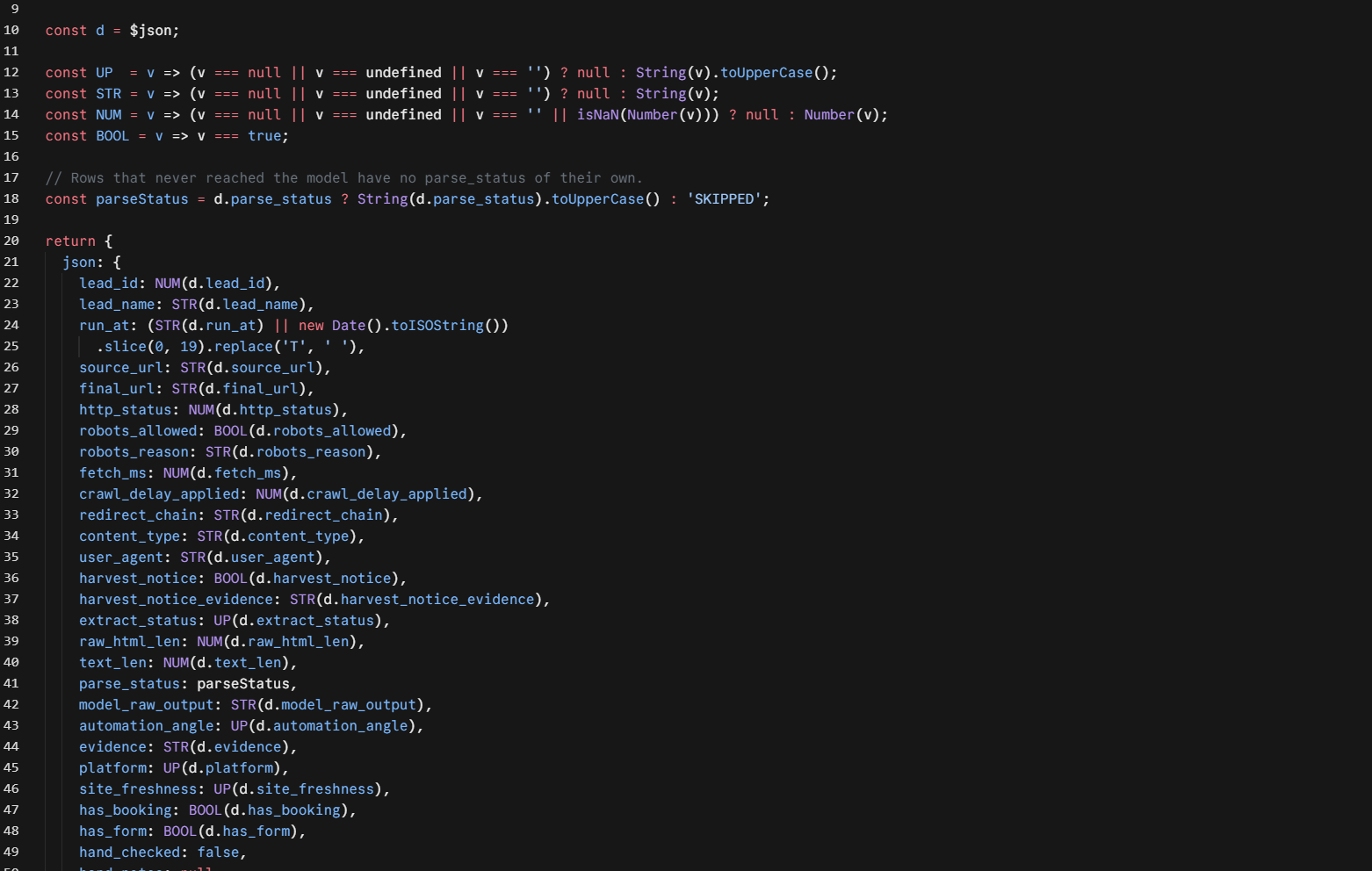
And it records all of that in the audit table on every single run. Fetch timestamp, HTTP status, whether robots allowed it and the exact reason, the crawl delay applied, the full redirect chain, content type, fetch duration, user agent, harvest notice status.
I did this because I sell on-premises deployments to businesses that care about data handling, and I’d look ridiculous pitching that while running a scraper that behaves badly. But it also just made the system easier to debug, because a pipeline that records why it decided not to do something is a pipeline that can tell you why it produced nothing.
Rules for what a regex can answer
The original design gave the model six fields to fill in. That was too many, and I figured that out on my first real test.
I ran a therapy practice site through it. The model came back saying the business had online booking, and its evidence was a phrase from the page: “Book a Free Consultation.”
Which is on the page. It’s a button. It’s also a mailto: link.
Extracted text can’t tell you the difference between a button that opens a Calendly widget and a button that opens your email client. Both render as the same words. The model wasn’t hallucinating, it was answering a question that its input couldn’t support.
So I split the work. Anything a regex can determine from the HTML became a rule. Platform detection, whether a contact form exists, whether a booking widget exists, and the most recent year mentioned on the page all moved out of the model and into code.
What’s left for the model is judgment. Given a page, which of several plausible automation angles does it actually support? What does this business primarily sell? Which sentence justifies that conclusion?
That felt obviously right. Deterministic beats probabilistic when the question has a deterministic answer.
Hold that thought.
The form was on a different page
With detection working, my test site came back with has_form: false. That site has a working contact form. It lives at /contact, and the homepage only links to it. Nine links to /contact on the landing page, zero form markup.
This isn’t a regex problem. Single-page extraction structurally under-detects lead capture on any multi-page site, which is most of them. Left alone, that field would have been near-uniformly wrong across the entire list.
The fix was to follow one contact-shaped link when the landing page shows neither a form nor a booking widget, then merge signals across both pages. Booleans OR together. Platform stays with the landing page, since that’s where the generator signature lives. Freshness takes the newer of the two years.
Two fetches per lead instead of one, and the crawl delay applies between them.
Getting a 4B model to behave
Small models are unreliable in specific, learnable ways.
The first thing that bit me was JSON that came back subtly malformed on maybe one run in five. Repeated keys, truncated strings, an unclosed brace. The cause was Ollama’s default repeat_penalty of 1.1.
That default exists for prose, where you don’t want the model saying the same phrase over and over. JSON is structurally repetitive. Every object needs its braces, every field needs its quotes and its colon. Penalizing repetition in structured output penalizes correctness. Setting it to 1.0 fixed a class of failures I’d been treating as random.
The second thing was constrained decoding. Ollama’s format parameter accepts a JSON schema and restricts token sampling so the output has to conform. That guarantees shape.
It does not guarantee truth. A schema-valid response can still contain a field the model made up. So I kept a deep parsing and validation step downstream anyway, and that step earned its keep in a way I’ll cover shortly.
Temperature at zero. Context at 16k, which is enough for two pages of extracted text with room for the instruction. A hard cap on output length, because a small model that starts rambling will ramble indefinitely.
And a schema with fewer than ten fields, enums wherever possible, no nullable values, and a required evidence field. The enums matter more than they sound. Asking a 4B model for a free-text category gets you eleven spellings of the same idea. Asking it to pick from a closed list gets you the list.
Four days of orchestration bugs
I’m going to go through these in detail because the specific bugs are less interesting than the pattern they share.
An equals sign. n8n stores expression fields with a leading = to mark them as expressions, and hides that character in the UI. Type it yourself and it becomes part of your value. My URL field resolved to =https://... and the request failed with Invalid URL.
Cost me one round trip. Worth mentioning only because the same character caused a second failure a week later, in the opposite direction, when I edited a workflow JSON file by hand and omitted the = on a request body. That expression arrived at the server as the literal text {{ JSON.stringify({...}) }}.
Any convention that means one thing in the interface and another in the file will eventually bite you in both directions.
A missing global, hidden by a bare catch. This one cost days.
The node that picks the best search result parsed each candidate’s hostname like this:
try { host = new URL(r.url).hostname.toLowerCase(); } catch { continue; }n8n’s Code sandbox doesn’t expose the URL global. Every iteration threw a ReferenceError, the bare catch swallowed it, and every candidate got skipped.
The output was indistinguishable from “the search engine returned nothing useful.” I had a genuine but secondary rate-limiting problem happening at the same time, which looked like a sufficient explanation and wasn’t. I spent most of a day chasing search engine configuration.
What finally exposed it was a diagnostic field I’d added for an unrelated reason. I’d started logging every candidate considered and the score it received, mostly so I could tune the scoring. The log came back reading n=42 | with nothing after the pipe. Forty-two results in, zero scored.
That narrowed a day of investigation to one line.
A catch that discards the error will eventually cost you more than every error it ever silenced. Catch the specific case, or record what you caught.
Item lineage that doesn’t survive a node. n8n lets a node reach backward and read another node’s output by name, which is enormously convenient and works only while item lineage is intact.
The NocoDB node emits fresh items with no pairing to what came in. So the Dolibarr writer chained behind it lost its ability to reference upstream data, and produced a PUT to /thirdparties/undefined.
The fix was structural rather than clever. Both writers now branch in parallel off the same convergence node, and each reads its own input directly. Nothing chains behind anything that breaks pairing.
I also replaced the native NocoDB node with a plain HTTP Request node, for a reason worth stating separately: the native node was silently writing null rows when my field names didn’t match, and reporting success. The HTTP node returns the actual API response, including the errors. A node that hides the API’s error messages from you is not a convenience.
The 500 with no message
Writing results back to Dolibarr returned HTTP 500. The body was:
{"error": {"code": 500, "message": "Internal Server Error"}}And a stack trace pointing at one line of the API source.
I went through auth headers. Through permissions. Through payload shape, date formats, and select-list values. All of it wrong, and each attempt produced the identical empty error.
Eventually I read the line the trace pointed at:
throw new RestException(500, $this->company->error);An empty message meant ->error was empty. Which meant the failure was real but the reporting was broken.
So I stopped debugging over HTTP and wrote fifteen lines of PHP that made the same call directly from the command line, where nothing could swallow the exception:
int(-3)
string(0) ""
array(1) { [0]=> string(25) "ErrorCustomerCodeRequired" }
There it is. The real message was in ->errors[], plural. The API reads ->error, singular. So every failed write in the entire system had been reporting nothing at all.
The underlying cause was mundane. 177 of my imported leads had a null customer code, and Dolibarr requires one for any record marked as a customer or prospect. One SQL backfill fixed all 177.
Two bugs, in two languages, four days apart, both of which were exceptions that something discarded before I could see them. That’s not a coincidence, it’s the single most expensive category of bug in this entire build.
When a framework’s own error handling is broken, reproduce the call outside the framework. Fifteen lines of throwaway script found in two minutes what six rounds of HTTP debugging had not.
A scoring function that couldn’t do its job
With the plumbing working, I ran a real batch. Seven leads out of twenty found a website. That’s not good enough to measure anything else, so the question became why.
The scorer summed per-token matches. Points for each word of the business name appearing in the domain, fewer points for the title, small bonuses for result rank and HTTPS. I’d noticed that low scores correlated with bad matches, so at some point I’d raised the acceptance threshold.
That made things worse, and the reason is arithmetic.
The maximum possible score scales with how many words are in the company’s name.
| Business | Name tokens | Best possible score | Threshold | Result |
|---|---|---|---|---|
| CleanJoule, Inc. | 1 | 8 | 10 | Rejected |
| Diamond Group LLC | 1 | 8 | 10 | Rejected |
| KP Fitness SLC DBA BodyRok | 3 | 16 | 10 | Accepted |
CleanJoule scored a perfect eight. Its domain matched exactly and its title matched exactly. It got rejected because a one-word company name cannot mathematically reach ten.
The correlation I’d observed was real. My conclusion from it was wrong. Low scores also correlated with short names, and a single threshold has no way to tell those two populations apart.
The fix was to stop asking a number to do the separating. A candidate now has to clear a gate first, meaning it has to contain a distinctive token from the business name in its hostname at all. Only survivors get scored, and the score does nothing but rank them.
That took discovery from seven of twenty to fifteen.
If tuning a parameter makes one failure mode better and another worse, the parameter isn’t the problem. Something upstream is measuring the wrong thing.
Common words identify nothing
A related failure, found later. “Tiny’s Auto LLC” matched tysautoutah.com, which is a different company in a different city. The word “auto” appeared in both. Meanwhile tinysltd.com sat lower in the same result list, already passed over.
The scorer had no concept that some words carry identifying information and some don’t. Auto, dental, care, group, solutions, partners, and every city name in the region can support a match. None of them can establish one alone. A word that every competitor in a vertical shares tells you nothing about which competitor you’re looking at.
That’s obvious stated plainly and very easy to miss when you’re writing a scoring loop and thinking about tokens as tokens.
The model kept abstaining
Every lead that reached the model came back with the null answer. Three for three, then six for six.
Two causes.
My prompt invited it. One line read: “Choose none_apparent when unsure. It is a correct answer, not a failure.” At temperature zero, a 4B model takes that exit every single time. I’d written the instruction to prevent overconfident guessing and instead built a system with exactly one behavior.
The model couldn’t see the answer. I was asking it whether a business has no way to capture leads, while giving it only extracted page text. Page text cannot tell you whether a <form> element exists. My rule layer had already computed that answer correctly, and then never passed it to the component making the judgment.
Fixed both. The verified rule outputs now get injected into the prompt as stated facts, and the abstention invitation got replaced with an ordered decision procedure that stops at the first matching rule.
Angles started firing immediately, with real quotes attached.
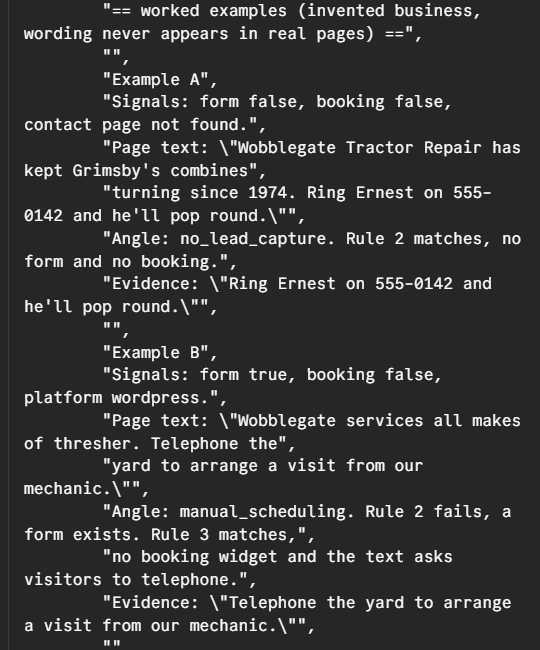
The model copied my examples
Adding worked examples introduced a new failure. Two leads came back with identical evidence:
“Call our office to book your appointment.”
That sentence was from the worked example in my system prompt. It was not on either page.
It survived my first review because it’s plausible. A dental practice and a law firm could both say that. It only became obvious when the same string turned up twice.
My validator caught both, because it checks whether the quoted text actually appears in the extracted page. But it caught them as a pair, which means a single instance might have slipped past me.
So I rewrote the examples around an invented business in another country, with phrasing like “Ring Ernest on 555-0142 and he’ll pop round.” If that shows up in a Salt Lake City dentist’s enrichment record, something has gone badly wrong and I can see it at a glance.
Copied evidence went from two of six to zero.
Make your examples impossible to mistake for real output. Plausible placeholder data hides the exact failure it exists to expose.
Gate 2
At this point I had a system that ran end to end. Which tells you nothing about whether it’s right.
So I ran the gate. Twenty leads across my priority segments. I opened all twenty sites myself and recorded what I observed, independently, before looking at what the pipeline had produced. Then I scored it field by field.
I printed the answer key on separate pages on purpose. Scoring against values you’ve already read isn’t a hand-check, it’s confirmation.
Above 90 percent, the field ships. Between 70 and 90, I rewrite the instruction and retest. Below 70, the field gets dropped or replaced with a rule.
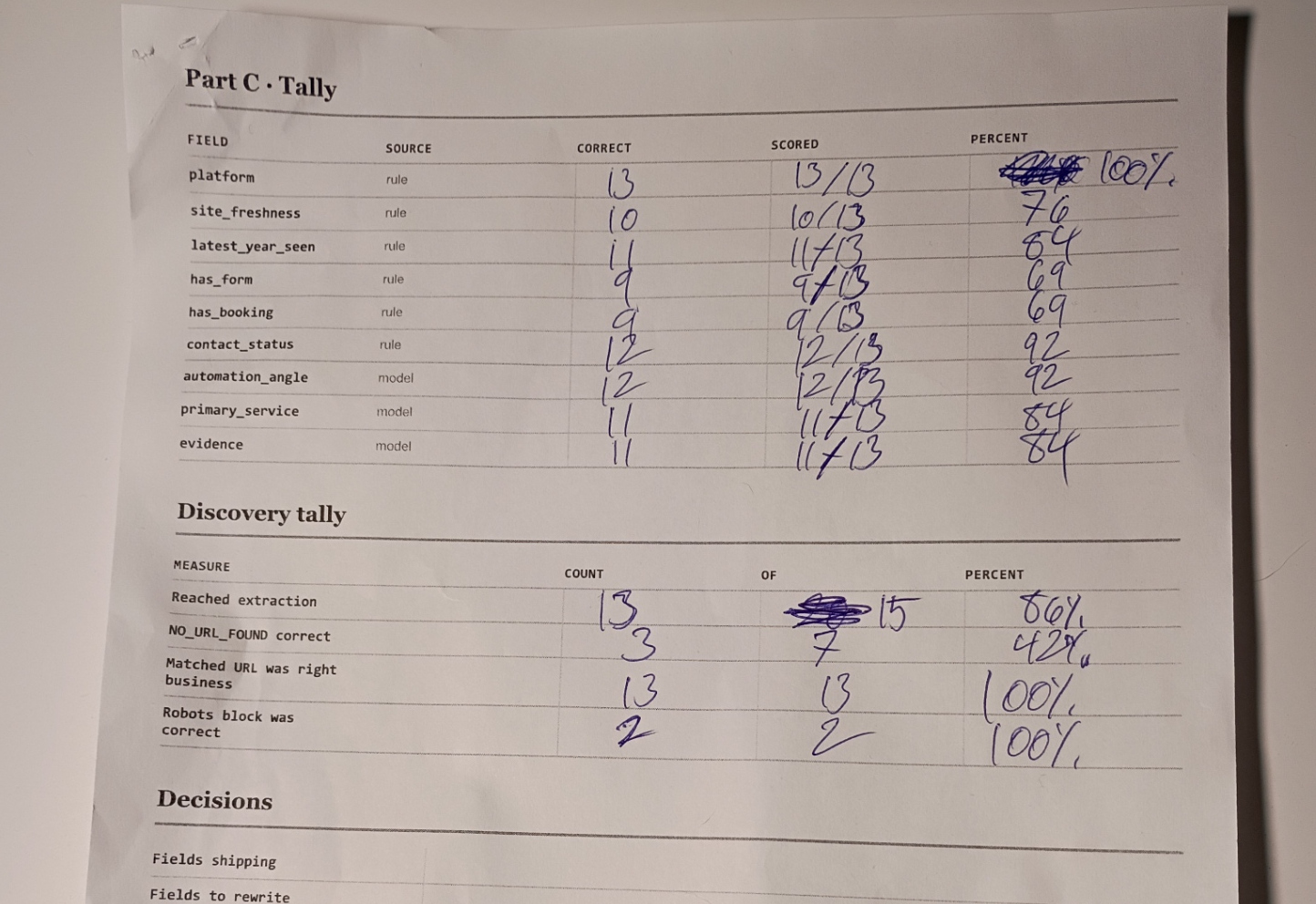
Thirteen of the twenty leads reached extraction. Here’s what the check produced.
| Field | Source | Score |
|---|---|---|
| Platform detection | rule | 13 of 13 |
| Contact page found | rule | 12 of 13 |
| Automation angle | model | 12 of 13 |
| Most recent year seen | rule | 11 of 13 |
| Primary service | model | 11 of 13 |
| Evidence quote | model | 11 of 13 |
| Site freshness | rule | 10 of 13 |
| Contact form present | rule | 9 of 13 |
| Booking widget present | rule | 9 of 13 |
Before anyone quotes those as accuracy figures, thirteen is a small sample and every single lead moves a field by nearly eight points. These are good enough to decide what to fix next. They are not good enough to put on a slide.
But look at the shape of it.
The thing I got wrong
My entire design direction had been moving work off the model and onto rules. Every iteration, another field migrated. It felt like discipline. Deterministic beats probabilistic, use the model only where you have to, don’t ask a language model to do a regex’s job.
The model scored higher than almost every rule I wrote.
The automation angle field, the one that actually matters because it’s what I’d open a call with, tied for second place across the whole system. It beat my form detection by twenty-three points. It beat my freshness detection by sixteen.
And it did that while being fed two rule outputs as stated facts, when those two rule outputs were wrong 31 percent of the time.
I don’t think my principle was wrong. Rules are still cheaper to debug, reproducible, and free to run. What was wrong was a quieter assumption underneath it: that a rule is automatically more reliable because it’s deterministic.
Determinism is a property of the process, not the output. It buys you reproducibility. It does not buy you accuracy. And it’s very easy to conflate the two when the rule is something you wrote yourself and can read in ten seconds.
My regexes were confidently, reproducibly, deterministically wrong about a third of the time. The model was reading the page.
What’s still broken
Both boolean detectors sit at 69 percent, which is my drop-or-fix threshold, and they fail in a specific direction. Booking was wrong four times, all false negatives. Forms were wrong four times, three false negatives and one false positive.
Near-uniform false negatives means the detector isn’t finding markup that exists.
The cause is that I was looking for the wrong artifact. Modern site builders don’t ship rendered elements. A Squarespace form arrives as JSON block configuration and renders client-side. A booking widget is a third-party embed that renders after load. All three Squarespace sites in my batch came back with no form detected, and all three have forms.
But the instructions are on the wire even when the result isn’t. The embed script tag, the iframe source, the platform block signature, all sitting in the raw HTML regardless of what renders later. Searching for mindbodyonline.com in a script source is more reliable than searching for a “Book Now” button, and it needs no headless browser.
That’s the fix, and it generalizes: when you can’t observe the thing you want, look for what causes it. The cause is usually earlier and easier to see.
There’s a second problem those two fields create. I had a derived field computed as !has_form && !has_booking, meaning the only way to reach this business is to dial a phone number by hand. Two inputs at 69 percent sound like they’d average out. They don’t. When both fail in the same direction, the derived flag fires precisely in the cases where both are wrong. The errors don’t cancel, they select for each other.
I suspended that field rather than ship a signal that was most confident exactly when it was least correct.
Discovery missed three sites, and the audit log showed three completely different causes.
One lead was named “NIX LAW,” and the log read no gateable tokens in name. My gate filtered “NIX” as too short and “LAW” as too generic, the surviving token set was empty, and the pipeline gave up before scoring a single result. The right domain may well have been sitting in those results. The gate needs a floor: when filtering empties the set, fall back instead of aborting.
One lead was “Providence Administrative and Consulting Services.” The correct domain, pacs.com, appeared in the results three separate times and got rejected each time, because “pacs” contains none of the name’s tokens. It’s an initialism. My gate is structurally blind to acronyms.
And one, a law firm, genuinely wasn’t in the results at all. Eight of the ten returned results were legal directories. That’s an engine coverage problem in a vertical where directories dominate organic results, and no amount of scoring cleverness would have helped.
Three misses, three unrelated fixes. The audit log is the only reason I know that.
And one match was wrong in a way that scares me. A lead called Millcreek Property Maintenance LLC matched millcreekut.gov, which is the City of Millcreek’s government website. It cleared my gate. The only thing that stopped it was that the site’s robots.txt timed out and my fail-closed rule kicked in.
If robots.txt had returned normally, I’d have enriched a municipal government site and written the result into a landscaping company’s record. That’s the worst failure mode this system has, and it got caught by luck rather than by design.
What it costs to run
The full pipeline is about 400 watts under load between the workstation and the model node. At the rate limiting I’ve now built in, 445 leads takes roughly three hours, which is about a kilowatt-hour, which at Utah residential rates is somewhere in the neighborhood of eleven cents.
I’m not going to pretend that’s the honest total. The honest total includes a week of my time, and my time isn’t free. If you value it at anything close to my hourly rate, Clay’s $185 was the cheaper way to get 445 enriched leads and it isn’t close.
But that’s not the comparison. I now own a system I can point at any list, for any client, on their hardware, with no per-record cost and no data leaving their network. The build cost was a one-time tuition payment. The marginal cost of the next 445 leads is eleven cents and three hours of a machine that was otherwise idle.
And I know exactly what it does and doesn’t know, which is not something a credit balance tells you.
What this actually means if you’re a business reading this
The single most consequential design error in this whole project had nothing to do with accuracy.
When discovery failed to find a company’s website, the pipeline originally recorded NO_SITE and wrote that to the CRM. In one early batch that happened to 85 percent of leads. Most of those businesses had perfectly good websites.
Think about what that produces. I pick up the phone, I look at my own CRM, and I open with “I noticed you don’t have a website” to someone who does. That’s worse than opening with nothing. The system wasn’t merely unhelpful, it was manufacturing false premises and handing them to me with confidence.
The fix was to split one status into several. Search unavailable. No URL found. Directory listings only. Confirmed no site. Only the last one gets written as a claim about the business. The others are recorded as facts about the pipeline.
The same principle came back at every layer. When extraction returned 0.2 percent of a page because the content renders in JavaScript, “no contact form detected” means “I couldn’t see one,” and asserting absence from a page you couldn’t read is the same mistake in miniature.
This is the part that transfers to every automation I build for a client. The question is never just “is it accurate.” It’s “what does it do when it doesn’t know?” A system that says nothing costs you an opportunity. A system that says something wrong costs you the relationship.
Most of the design decisions in this build came down to telling those two apart.
Where it stands
Gate 2 hasn’t formally passed. Thirteen of twenty reached extraction against a threshold of fifteen, and two fields sit below my drop line with a known cause and an unimplemented fix.
I could have waited to publish this until the numbers were clean. I decided the honest version is more useful, because the interesting content isn’t a system that worked. It’s a scoring function whose ceiling depended on how many words were in a company’s name. It’s an API that couldn’t report its own errors. It’s a model quoting the example written by the person who built the checker that caught it. And it’s a measurement that told me my architecture had been moving in the wrong direction for a week.
One last thing worth saying plainly, because the easy read of this article is the wrong one.
None of this is a story about AI being unreliable. The model was the second-best-performing component in the system. Nearly every failure was in the plumbing around it, hand-written, by someone who understood exactly what he meant.
I’m Jake Cannon. I build automation and self-hosted infrastructure for small businesses in Salt Lake City, and I do the work myself. If you’ve got a process that’s eating hours a week and you’d rather it ran on hardware you own, get in touch.